Introducing QFG Dynamics: Field-Driven Physics for Blender
What if a Blender scene could be more than geometry, rigid bodies and keyframes? What if the scene itself could become a numerical laboratory — with fields, forces, topology, structural constraints and dynamic feedback all interacting inside the same environment?
That is the idea behind QFG Dynamics 1.0.0, our new experimental physics and scientific-visualization extension for Blender 5.2.
QFG Dynamics brings together real-time scene interaction, 3D numerical fields, six-degree-of-freedom body dynamics, collisions, thermal effects, structural analysis and procedural scientific geometry in a single Blender workflow.
It was originally developed as part of our work around Q-Field Geometry (QFG) and BSM-SG structural modelling, but the resulting system quickly became something much broader: a physics playground for artists, technical directors, developers and researchers who want to experiment with motion and structure beyond the traditional rigid-body simulation model.
Blender as a physics laboratory
Blender is already an extraordinary environment for modelling, rendering and animation.
QFG Dynamics adds another layer.
Instead of treating objects only as passive geometry, the extension allows them to participate in a numerical world containing dynamic fields and interacting bodies.
A scene can contain:
- scalar or reduced spinor fields;
- localized Gaussian field nodes;
- vortex and Hopf-ring structures;
- plane-wave sources;
- boundaries and detectors;
- field-coupled dynamic bodies;
- thermal feedback;
- structural interaction graphs;
- force and torque responses;
- topology and reduced-order research models.
The result is a workflow in which geometry can generate a field, the field can affect moving bodies, and — in specialized workflows — the resulting field can feed back into structural geometry.
This makes Blender not simply a visualization tool, but an interactive simulation environment.
Field-driven 6-DoF dynamics
One of the central parts of QFG Dynamics is its six-degree-of-freedom dynamics engine.
Dynamic bodies can translate and rotate while interacting with the simulated field.
The runtime includes support for:
- position and velocity;
- orientation and angular velocity;
- body mass;
- force and torque coupling;
- gravity;
- linear and angular drag;
- floor collisions;
- body-to-body contacts;
- restitution and friction;
- velocity safety limits;
- deterministic replay.
This makes it possible to build scenes where motion emerges from interactions rather than from predefined animation paths.
For an artist, that means unusual forms of procedural motion.
For a technical user, it means access to force, torque, momentum and collision telemetry.
For a developer, it means a simulation layer that can also be controlled through Python.
Fields you can actually see
Numerical fields can be difficult to understand when they exist only as arrays of values.
QFG Dynamics turns them into visible structures inside Blender.
The extension can generate:
- 3D density point clouds;
- central density slices;
- vector and force overlays;
- animated field structures;
- trajectory visualizations;
- topology diagnostics.
This allows the user to move continuously between numerical simulation and visual interpretation.
The visual layer is particularly useful for creating scientific animation, abstract motion graphics, technical illustrations and cinematic effects.
A field can become a visible object rather than an invisible equation.
From Gaussian nodes to vortices and Hopf structures
QFG Dynamics includes several field actor types.
A scene can begin with a simple localized Gaussian node, or with more complex field configurations such as:
- Gaussian sources;
- plane waves;
- vortices;
- Hopf-ring ansatz structures;
- static boundaries;
- dynamic bodies;
- detectors.
These actors can be combined into more elaborate starting configurations.
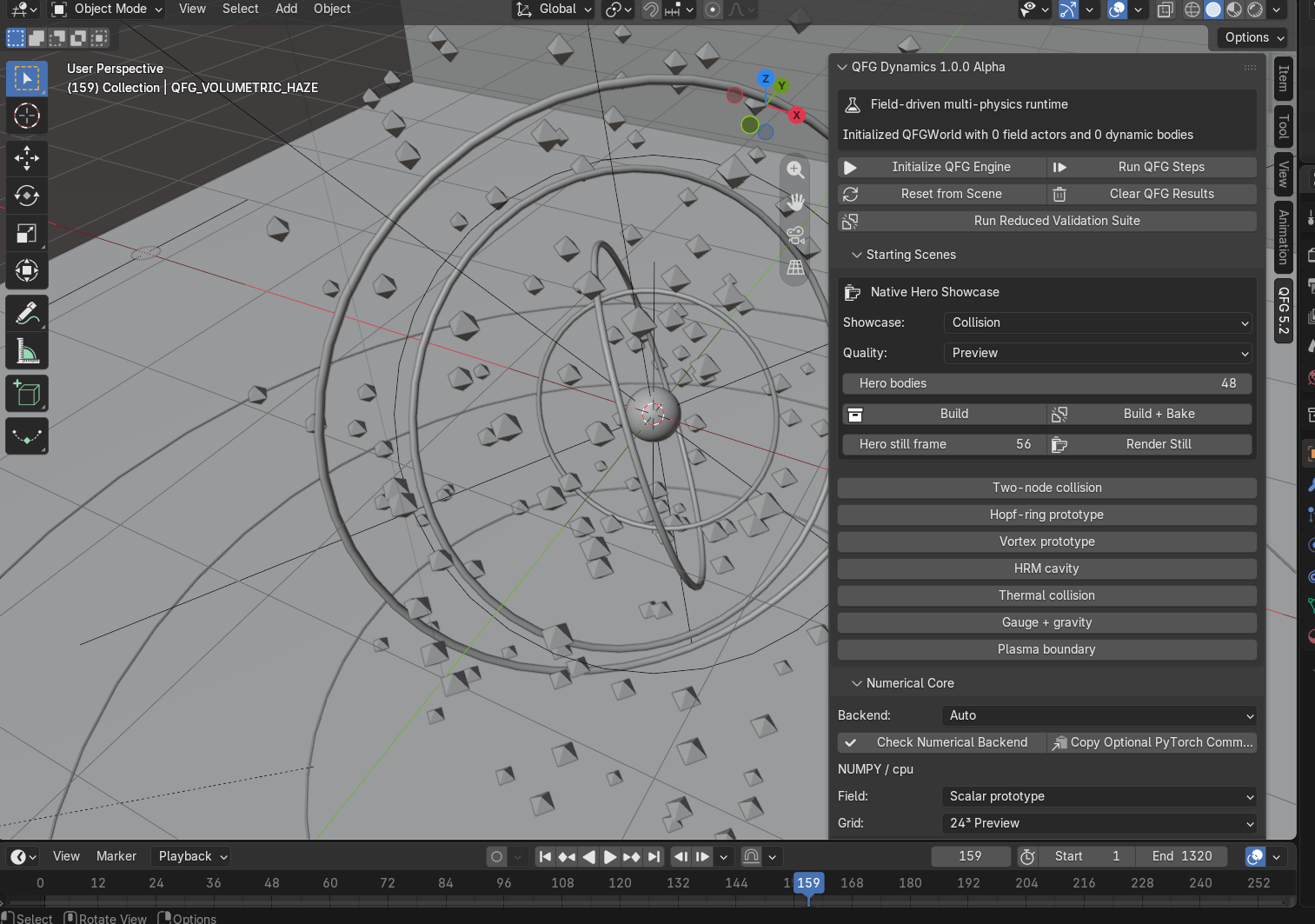
The extension also includes ready-made Starting Scenes, allowing new users to explore the system without building everything manually.
Examples include:
Two-node collision
A simple introduction to interacting field structures and dynamics.
Hopf-ring prototype
A visual and numerical exploration of a reduced topological field configuration.
Vortex prototype
A phase-winding field structure.
Thermal collision
A collision combined with thermal feedback.
Gauge + gravity
A demonstration of the reduced gauge and weak-field gravity sectors.
Plasma boundary
A driven boundary and glow-plasma proxy experiment.
These scenes are designed both as educational starting points and as raw material for artistic experimentation.
Built for animation
QFG Dynamics is not only about stepping a simulation manually.
The extension contains a timeline baking system designed specifically for Blender animation workflows.
A numerical simulation can be calculated in advance and stored for playback on the Blender timeline.
This is important because complex field simulations are too expensive to recompute every time the playhead moves.
Instead, the workflow becomes:
configure → simulate → bake → animate → render
Once baked, the simulation can be combined with standard Blender cameras, materials, lighting, volumetrics and compositing.
That is how we created our QFG cinematic demonstration.
The simulation produces the motion and field state.
Blender turns that state into a cinematic scene.
A different kind of tool for artists
Although QFG Dynamics originated from scientific work, we believe it has an interesting creative side.
Artists can use the system to explore:
- energy-field effects;
- abstract particle structures;
- procedural orbital motion;
- dynamic interaction networks;
- unusual force-driven movement;
- scientific visualizations;
- futuristic interfaces;
- cinematic simulation sequences;
- motion graphics based on real numerical state.
Because the movement is generated by the simulation rather than manually animated, scenes can develop behaviours that would be difficult to reproduce using conventional keyframes alone.
That unpredictability — while still remaining reproducible through deterministic seeds — can be creatively useful.
BSM-SG / Atlas structural tools
QFG Dynamics also contains a specialized Atlas Direct / BSM-SG workflow.
This part of the extension is designed for structural research rather than general-purpose animation.
It includes a six-stage pipeline:
B1 — Source Geometry
Objects can be tagged and classified while retaining provenance information.
B2 — Interaction Graph
Structural nodes can be connected using interaction graphs \(J_{ij}\), orbital-plane relationships and geometric envelopes.
B3 — Atlas → QFG Field
Structural geometry can be converted into a numerical field source.
B4 — QFG → Geometry Feedback
The simulated field can generate bounded translation and rotational feedback.
B5 — Structural Constraints
Connectivity, radial shells, angular freedom and symmetry constraints can be preserved during relaxation.
B6 — Blind Relaxation
A reproducible structural relaxation workflow can be executed without using the experimental reference value during convergence.
The system also generates a SHA-256 protocol fingerprint so that a numerical configuration can be identified and reproduced later.
Provenance matters
One of the principles behind the Atlas tools is that the software should clearly distinguish between different kinds of information.
QFG Dynamics uses provenance labels such as:
SOURCE — directly reviewed input geometry or metadata.
DERIVED — deterministically calculated from source information.
CONDITIONAL — dependent on an explicit modelling assumption.
CALIBRATED — dependent on a reference or measurement.
EXPERIMENTAL — externally measured or reported data.
REJECTED — retained only for audit or history.
This distinction is important because a visually convincing simulation is not automatically a validated physical model.
The software deliberately keeps that distinction visible.
More than one solver
QFG Dynamics also includes a collection of reduced-order research modules.
These include:
- thermal diffusion and collision heating;
- dual-frequency HRM driving;
- topology and Skyrme-style diagnostics;
- reduced U(1) gauge behaviour;
- weak-field gravity proxies;
- noise robustness testing;
- nonlinear RF resonator models;
- plasma response proxies;
- cavity and MEMS tools;
- Yb quantum-control experiments;
- molecular geometry and optimization tools.
These modules are intended as experimental modelling and comparison tools.
They are not presented as replacements for specialized first-principles solvers.
Instead, they provide a common environment in which geometry, numerical models and visualization can interact.
Diagnostics instead of black boxes
We did not want QFG Dynamics to behave like a black box.
The extension exposes a large amount of runtime information.
Depending on the active modules, users can inspect:
- simulation time;
- field norm;
- maximum density;
- energy proxies;
- temperature;
- force and torque magnitudes;
- body momentum;
- angular momentum;
- collision counts;
- Atlas field statistics;
- convergence information;
- numerical runtime profiling.
A dedicated 6-DoF Debug Overlay can display contacts, force vectors, torque vectors and body state directly in the viewport.
For exploratory work, seeing why a system moves is often as important as seeing the movement itself.
Reproducibility
QFG Dynamics supports deterministic seeds and exportable simulation settings.
Important runs can therefore be stored together with:
- the Blender scene;
- numerical parameters;
- session exports;
- Atlas reports;
- simulation seeds;
- grid resolution;
- timestep;
- protocol fingerprints.
This makes it possible to reproduce a simulation rather than simply recreate something that looks similar.
For research workflows, that distinction is essential.
Python SDK
The simulation engine can also be accessed directly from Python.
A simple QFG world can be created programmatically and populated with field actors and dynamic bodies.
Conceptually, the workflow looks like this:
from qfg_lab_52.sdk import ( create_world, EngineConfig, WorldConfig, ActorSpec, BodySpec,)world = create_world( EngineConfig( grid_size=32, dt=0.002, backend="NUMPY", ), WorldConfig( substeps=2, deterministic=True, seed=1337, ),)world.add_field_actor( ActorSpec( center=(0, 0, 0), radius=1.2, ))world.add_body( BodySpec( name="Body", position=(4, 0, 0), velocity=(0, 1, 0), field_coupling=2.0, radius=0.25, )This opens the door to custom tools, procedural scene generation and automated simulation pipelines.
Designed for experimentation
QFG Dynamics is intentionally broad.
It is not attempting to replace Blender's existing rigid-body engine, molecular-dynamics packages, CFD tools or dedicated scientific solvers.
Instead, it explores a different idea:
What happens when numerical fields, structural geometry, dynamics and visualization are allowed to coexist inside the same Blender scene?
That question has already led us into some surprisingly interesting territory.
It has also produced a tool that can be approached from very different directions.
An artist may never touch the Atlas research tools.
A researcher may care little about cinematic rendering.
A developer may use only the SDK.
All three can work with the same underlying system.
QFG Dynamics 1.0.0
The first public release includes:
- Blender 5.2 integration;
- numerical scalar and reduced spinor fields;
- field-driven six-degree-of-freedom dynamics;
- collisions and contacts;
- thermal simulation;
- topology tools;
- reduced gauge and gravity models;
- HRM, RF, plasma, cavity and MEMS modules;
- Yb quantum-control tools;
- Molecular Creator;
- Atlas Direct / BSM-SG B1–B6;
- timeline baking;
- visualization and debug tools;
- diagnostics and export;
- Python SDK access;
- built-in showcase scenes.
And this is only the beginning.
Try it, break it, build something unexpected
QFG Dynamics 1.0.0 is an experimental first public release.
We expect the interface and API to continue evolving as the tool is tested by people outside our own development environment.
We are particularly interested in seeing what Blender artists do with it.
Not because every user needs to care about QFG, topology or structural research — but because a field-driven simulation engine inside Blender can become something entirely different in the hands of an artist.
Build a field.
Drop objects into it.
Let the system evolve.
Then point a camera at the result.
That may be the most interesting way to start.
Title:
Introducing QFG Dynamics: Field-Driven Physics for Blender
Slug:qfg-dynamics-field-driven-physics-blender
Excerpt:
QFG Dynamics brings 3D numerical fields, 6-DoF dynamics, collisions, topology, thermal effects and structural simulation into Blender 5.2 — turning a Blender scene into an interactive physics laboratory.
Tags:QFG Dynamics, Blender, Physics Simulation, Scientific Visualization, BSM-SG, 3D, Open Source